
A P45 has four parts, and only one of them, Part 3, ever reaches the new employer [1]. Every employer must report a new starter to HMRC on or before that person's first payday, and the P45 is the single document that tells the new payroll where the employee's tax position stood when they left their last job [2]. Used correctly, it puts the right tax code in place from day one. Used carelessly, or not at all, it pushes the new starter onto an emergency code and over-deducts tax for weeks.
This guide is written for the employer receiving a new starter, whether that is an SME owner running payroll in-house or a payroll administrator processing dozens of joiners a month. It sets out what the P45 contains, which part the new employer keeps, how that part feeds the first Full Payment Submission, and the exact procedure when a new employee has no P45 to hand over.
If a starter arrives without a P45 and lands on an emergency code, our free tax code checker shows exactly what W1/M1 means for their pay.
The starting point for any employer is to confirm whether the new worker even needs to go through PAYE, then to gather the information that determines their tax code. The P45 is the cleanest way to gather that information, but it is not the only way, and it is not always usable.
Key takeaways
- A P45 has four parts. The previous employer keeps none of them after issue, the leaver keeps Parts 1A and 2, and the new employer keeps Part 3 [1].
- The new employer must tell HMRC about the starter on or before the first payday, using the figures from Part 3 in the first Full Payment Submission [2].
- A worker earning £129 a week or more must be put through PAYE, the point at which a tax code and a P45 process matter [3][12].
- When a new starter has no P45, or left their last job before 6 April of the previous tax year, the employer uses a starter checklist instead [4].
- Payroll records, including the P45 information, must be kept for three years after the end of the tax year they relate to [5].
What a P45 actually contains
The P45, formally titled Details of employee leaving work, is the certificate a previous employer issues when an employee leaves [1]. It carries the figures the new payroll needs to continue the employee's tax position without starting from scratch. Each field exists so the receiving employer can set a cumulative tax code correctly [6].
The document records the employee's full name and National Insurance number, the leaving date, the tax code in force at that date, and whether that code ran on a cumulative or Week 1 / Month 1 basis [1]. It also shows the total pay and total tax for the tax year to the leaving date, plus the student loan deduction status [6].
One detail trips up employers more than any other: the year-to-date pay and tax figures on the P45 cover the whole tax year from 6 April, not just the period the employee spent with the previous employer [6]. If the worker had an earlier job in the same tax year, those earlier figures are already carried into the P45 total. The new employer continues from that combined total, which is exactly how a cumulative code keeps the year's tax correct [7].
The four parts and where each one goes
A P45 is produced in four parts, and the split matters because the new employer is entitled to one specific part. The previous employer sends Part 1 to HMRC electronically through their final payroll submission [1]. The remaining parts travel with the leaver.
| Part | Who holds it | Purpose |
|---|---|---|
| Part 1 | HMRC | Sent by the old employer via the payroll submission, the new employer never sees it [1] |
| Part 1A | The employee | The leaver's personal copy to keep for their own records [6] |
| Part 2 | The new employer | Retained by the new employer alongside Part 3 [6] |
| Part 3 | The new employer | Used to register the starter and set the tax code in the first submission [2] |
In practice the employee hands over Parts 2 and 3 together when they start, and the new employer keeps both [1]. Part 1A stays with the worker. Any business running HMRC-recognised payroll software for SMEs enters the Part 3 figures once and the system carries them into the first Full Payment Submission automatically.
Where to read the figures you need
The tax code and the year-to-date totals a new employer needs sit in two specific zones of the form. This is Part 3, the copy that reaches you, in the same layout as Part 1 below.
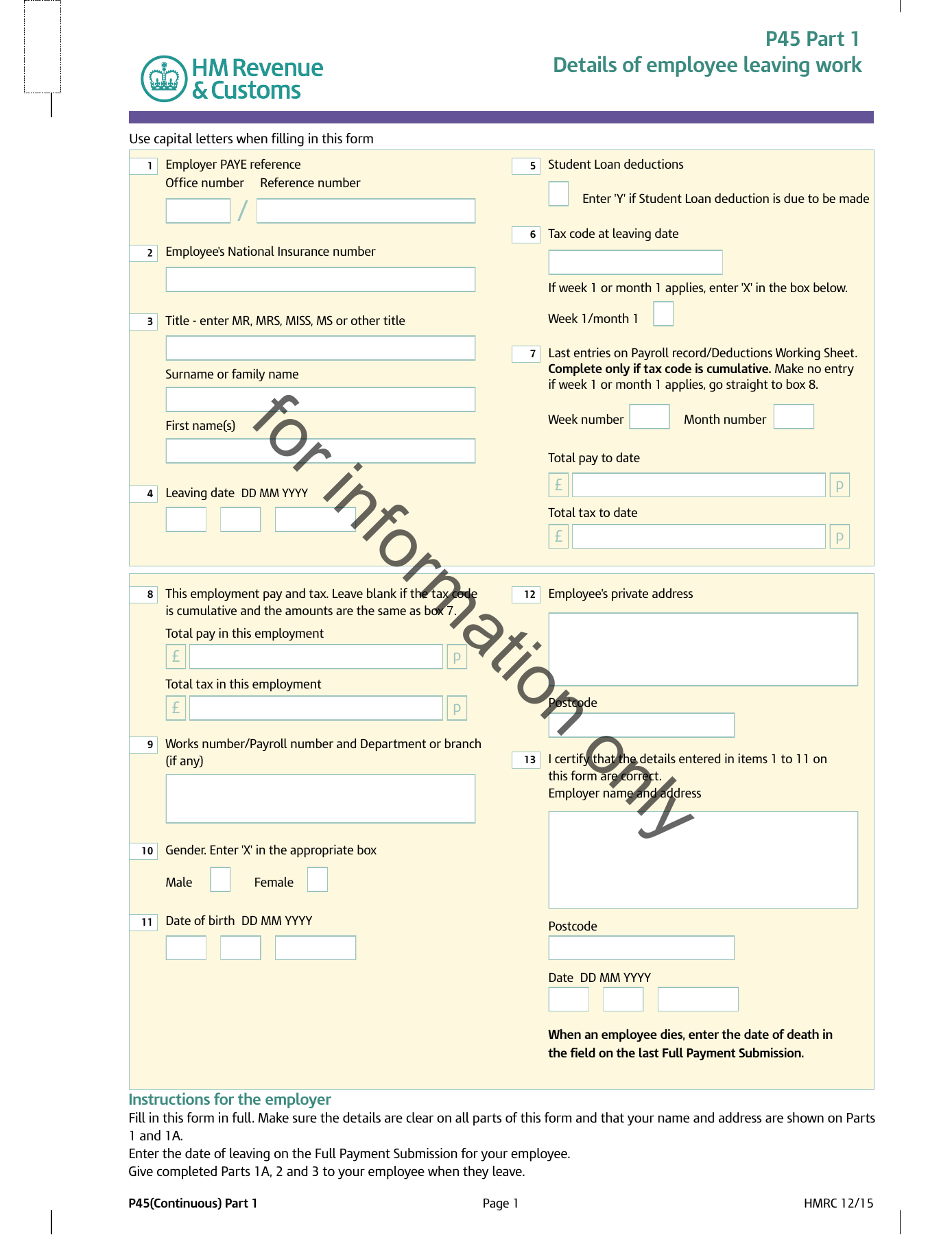
Boxes 1 to 4. Employer PAYE reference, National Insurance number, the employee’s name and the leaving date.
Boxes 5 to 7. The tax code in use at leaving, and whether it runs on a week 1 or month 1 basis.
Boxes 8 to 11. Total pay and total tax to date, and the same figures for this employment only.
Boxes 12 and 13. The employee’s address and the employer’s certification of the figures.
Every box is set out one by one, with a zoom on each zone, in What is a P45?.
Setting the tax code from the P45
The whole point of receiving Part 3 is to set the new starter's tax code so the first payrun deducts the right amount of tax. The standard code for the 2026-27 tax year is 1257L, reflecting the £12,570 personal allowance, and a P45 showing that code on a cumulative basis lets the new employer continue seamlessly [7][13].
Where the P45 shows a cumulative code, the new employer uses the year-to-date pay and tax figures to keep the running total accurate [6]. Where it shows a Week 1 / Month 1 code, each pay period is treated independently and no refund of earlier overpaid tax flows through this employment [7]. The basis on the P45 is therefore as important as the code number itself.
When the employee hands over more than one P45
It is not unusual for a new starter to arrive with two P45s, typically from overlapping or back-to-back jobs. The rule is straightforward: the employer uses the P45 with the most recent leaving date and returns the other to the employee [2]. Only one set of year-to-date figures can feed the payroll, and the latest leaving date carries the most current position [6].
If the P45 also shows a continuing student loan deduction, the new employer carries that on from the start date rather than waiting for a separate notice [8][14]. The mechanics of those deductions are covered in a separate guide to student loan deductions explained, but the trigger at onboarding is the P45 itself.
When the new starter has no usable P45
A P45 is the cleanest route, but plenty of new starters do not have one. The worker may be in their first job, may have lost the form, or may have left their previous role too long ago for the figures to be valid. In each case the employer turns to the starter checklist, the form that replaced the old P46 [4].
The checklist also applies where a P45 exists but is out of date. If the employee left their last job before 6 April of the previous tax year, the P45 figures are no longer reliable and the employer must use the starter checklist instead [9]. The checklist asks the employee to pick one of three statements, A, B or C, which between them set the starting tax code [4].
The three starter declarations
The starter checklist resolves to one of three declarations, and each produces a different tax code. The employee chooses the statement that matches their circumstances, and the employer applies the corresponding code in the first submission [4].
| Statement | Employee's situation | Resulting code |
|---|---|---|
| A | First job since 6 April, no other taxable income or benefits in the year | Standard 1257L on a cumulative basis [4] |
| B | Now their only job, but has had another job or taxable benefit since 6 April | Standard 1257L on a Week 1 / Month 1 basis [4] |
| C | Has another job or receives a pension alongside this one | BR, basic rate on all pay with no personal allowance [10] |
Statement A is the most favourable to the employee. Statement C, common for second jobs, applies basic rate to every pound because the personal allowance is assumed to be used elsewhere [10]. Where the employee genuinely cannot say which fits, statement B is the prudent default [4]. For a small business payroll processing occasional joiners, getting the declaration right at the outset avoids a string of corrections later.
The emergency tax code trap
When neither a P45 nor a starter checklist is available before the first payday, the employer has to run the employee on an emergency code [10]. For a worker with no allowance information at all, that often means a 0T code on a Week 1 / Month 1 basis, which applies no personal allowance and taxes every pound through the normal bands [10].
The result is over-deduction. Emergency codes resolve once HMRC issues the correct cumulative code, usually within a pay cycle or two under Real Time Information, and the employee's payroll then refunds any overpaid tax through their wages [7]. The faster the employer collects a P45 or completes a starter checklist, the shorter that period of over-deduction. Even an employer issuing a one-off HMRC-compliant payslip for a single payment needs to apply the right code from the start.
Reporting the starter to HMRC
Whatever the source of the tax code, the employer must report the new employee to HMRC on or before their first payday through the first Full Payment Submission [11]. That submission carries the information gathered from Part 3 or the starter checklist, the chosen tax code and declaration, and the pay and deductions from the start of this employment only [2][15].
Software that holds the HMRC Recognised badge files the Full Payment Submission automatically and reflects the starter's details without manual reformatting. An HMRC-recognised payroll API lets a platform register a starter, set the code and submit in a single integrated flow, which is the pattern bureaux and HR platforms rely on when onboarding at volume. Accountants running this across many client schemes typically use a multi-client payroll dashboard that flags missing P45s before the first payrun.
The P45 information then forms part of the payroll record the employer is legally required to keep. Those records must be retained for three years after the end of the tax year they relate to, and HMRC can estimate liabilities and charge a penalty where records are incomplete [5].
Conclusion
The P45 is a handover document, and the new employer is only ever the recipient of Part 3, never the author. Read correctly, it does the heavy lifting of onboarding: it sets the tax code, carries the year-to-date figures and flags any student loan, so the first payrun lands on the right number. The moment it is missing or out of date, the starter checklist and its three declarations take over, and the discipline shifts to picking the right statement before the first payday.
The wider pattern across UK payroll is a move towards real-time correction rather than year-end reconciliation. Emergency codes that once lingered for months now resolve within a pay cycle or two, provided the starter information reaches HMRC promptly and the payroll continues the cumulative calculation correctly. The employer who treats the first payday as the deadline, not an aspiration, rarely sees an emergency code at all.
Frequently asked questions
Which part of a P45 does a new employer keep?
The new employer keeps Parts 2 and 3, which the employee hands over when they start [1]. Part 3 is the one used to register the starter with HMRC and set the tax code in the first Full Payment Submission [2]. Part 1 has already gone to HMRC from the old employer, and the employee keeps Part 1A for their own records.
What does an employer do if a new starter has no P45?
The employer asks the new starter to complete a starter checklist, the form that replaced the P46 [4]. The checklist resolves to one of three statements, A, B or C, which set the starting tax code. The same applies where the employee has a P45 but left that job before 6 April of the previous tax year, because those figures are no longer valid [9].
Can an employer use a P45 from a previous tax year?
No. If the leaving date on the P45 falls before 6 April of the previous tax year, the year-to-date figures are out of date and must not be used [9]. The employer uses a starter checklist instead to determine the tax code [4]. A P45 from the current tax year remains the preferred source.
What happens if a new employee starts on an emergency tax code?
An emergency code applies when no tax code information is available by the first payday, and it usually means no personal allowance is given, so the employee is over-taxed [10]. Once HMRC issues the correct cumulative code, the payroll recalculates and refunds any overpayment through the employee's wages, typically within one or two pay cycles [7]. Collecting a P45 or completed starter checklist quickly keeps that period short.
Part 3 of the form, the section the new employer completes, is explained box by box in our guide to what is a P45; the official HMRC specimen (PDF) shows the exact layout.