
A P45 is the form an employer must give an employee when they stop working, and it is one of three core PAYE forms alongside the P60 and the P11D [1]. It records pay and tax from 6 April up to the leaving date, and a new employer relies on it to apply the correct tax code from the first payslip [2].
The form matters because the alternative is costly. An employee who starts a new job without a P45, and without completing the right paperwork, is usually placed on an emergency tax code and can overpay tax for several pay periods [3]. For employers, issuing the P45 correctly is a legal duty under the Income Tax (Pay As You Earn) Regulations 2003 [4].
This article explains what a P45 is, what each part of it does, the information it carries, when an employer must issue it, and the correct route when an employee arrives without one.
Key takeaways
- A P45 is issued when an employee leaves a job partway through the tax year, not at year end.
- The form is produced in four parts: Part 1, Part 1A, Part 2 and Part 3, each with a distinct destination.
- It shows the leaving date, the tax code, and year-to-date pay and tax up to the day of leaving.
- A lost P45 cannot be reissued; the employee completes a starter checklist instead.
- Without a P45 or starter checklist, an emergency tax code applies and the employee may overpay tax.
What a P45 is and why it exists
A P45 is titled "Details of employee leaving work". An employer issues it when an employee stops working, and Jobcentre Plus issues an equivalent when a person stops claiming Jobseeker's Allowance [1]. Its purpose is continuity: it carries an employee's PAYE position from one job to the next so that tax is deducted accurately rather than reset to a default.
The figures on a P45 are cumulative for the tax year. They show total pay and total tax deducted from 6 April to the leaving date, which lets a new employer continue the calculation rather than start again from zero [2]. That continuity is what prevents an emergency code and the overpayment that often follows it. Employers running HMRC-recognised payroll software generate the P45 automatically from the final payrun, so the leaving figures match what was reported to HMRC.
The P45 sits within the wider Real Time Information system. Since RTI was introduced, the employer no longer posts Part 1 to HMRC on paper; the leaver's details reach HMRC through the Full Payment Submission instead [5]. The paper form survives for the employee and the next employer.
The four parts of a P45
The P45 is produced in four parts, and each one has a different destination. Confusing the parts is a common cause of onboarding errors, so the table below sets out where each goes and what it is for [2] [6].
| Part | Goes to | Purpose |
|---|---|---|
| Part 1 | HMRC | Reported electronically via the FPS leaving date and year-to-date fields, so paper is no longer sent |
| Part 1A | The employee | Kept for personal records and any self-assessment tax return |
| Part 2 | The new employer | Retained by the new employer for their payroll records |
| Part 3 | The new employer | Used to register the starter with HMRC and apply the correct tax code |
An employee with a paper P45 only needs to hand Parts 2 and 3 to a new employer, keeping Part 1A safe [2]. HMRC advises keeping Part 1A securely because a replacement cannot be issued once it is lost [7].
What information a P45 contains
A P45 is a compact record of an employee's PAYE position at the point of leaving. It carries personal identifiers, the leaving date, the tax code in force, and the cumulative pay and tax figures for the year so far [2]. Where deductions are in progress, it also flags student loan repayment status so the new employer can continue them [8].
| Field | What it records |
|---|---|
| Employee details | Name and National Insurance number |
| Leaving date | The last day of employment in the current tax year |
| Tax code | The code in use at the leaving date |
| Total pay to date | Cumulative gross pay from 6 April to the leaving date |
| Total tax to date | Cumulative tax deducted in the same period |
| Student loan status | Whether deductions should continue with the new employer |
The pay and tax figures on the P45 must match what the employer reported through RTI. A mismatch between Part 1 figures and the FPS is a recognised error type that HMRC flags for correction [9]. Accountants reconciling leaver data across several employers often manage this through dedicated payroll bureau software that ties the P45 output to the submission record.
Every box on the P45, explained
Here is the official HMRC form itself, zone by zone. The P45 has four parts: Part 1 holds the leaver's details (since Real Time Information this data reaches HMRC through the Full Payment Submission rather than by post), Part 1A is the employee's copy to keep, and Parts 2 and 3 go to the new employer. The official overview lives on GOV.UK. Crown copyright, reproduced under the Open Government Licence v3.0.
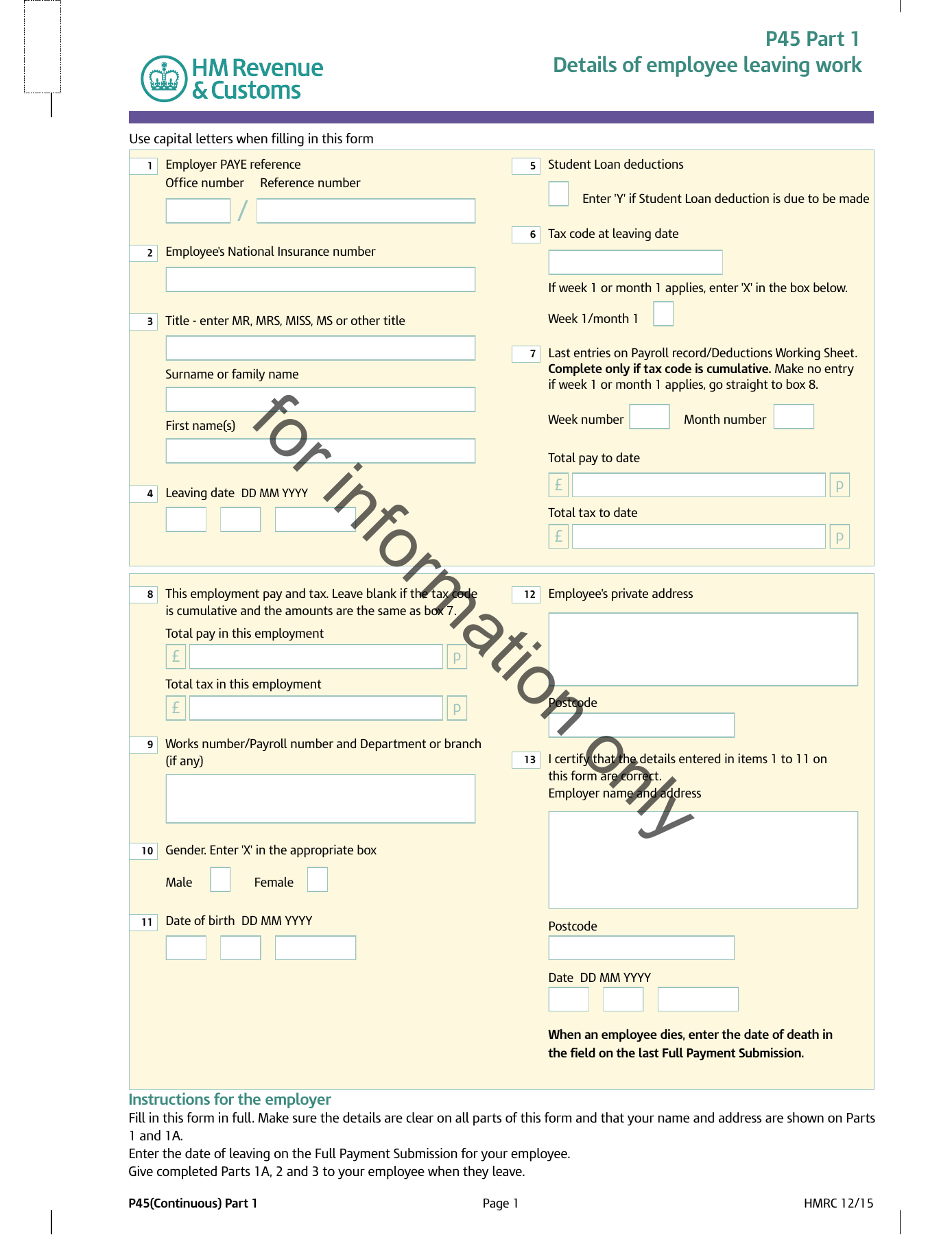
Boxes 1 to 4: who the form is about
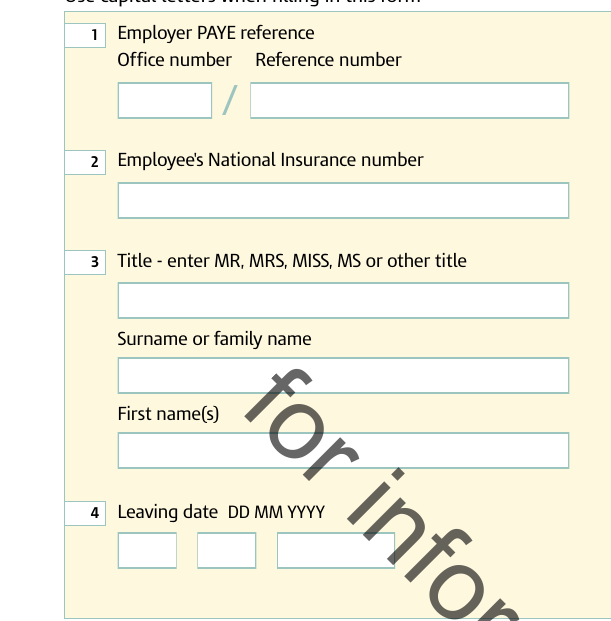
Employer PAYE reference. Two halves: the three-digit tax office number, a slash, then the employer's reference (for example 123/AB456).
National Insurance number. The anchor HMRC uses to match the record to the employee.
Title and name. Title, surname and first names, in capitals.
Leaving date. The employment end date, identical to the one reported on the final Full Payment Submission.
Boxes 5 to 7: the tax position at leaving
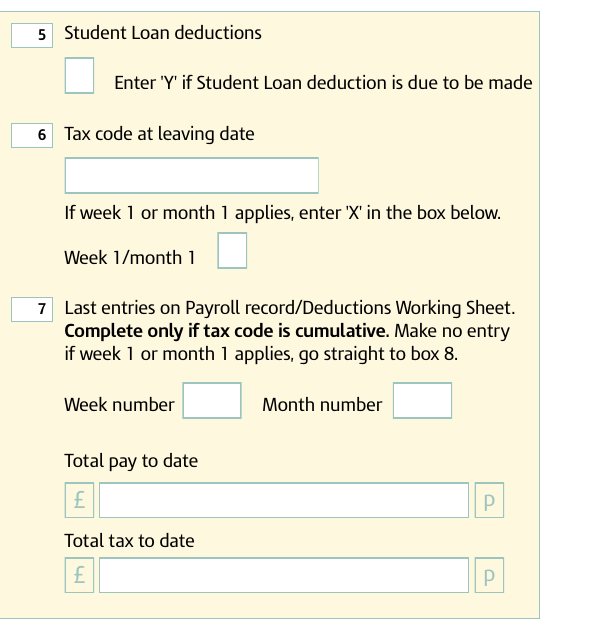
Student Loan deductions. A single flag: 'Y' means deductions were being made and should continue in the next job.
Tax code at leaving date. With a separate 'X' marker if the code ran on a week 1/month 1 basis, each period taxed in isolation. Decode any code with our tax code checker.
Last entries on the payroll record. The heart of the form: week or month number of the final payment, total pay to date and total tax to date for the whole tax year. Completed only when the code is cumulative.
Boxes 8 to 11: this employment only
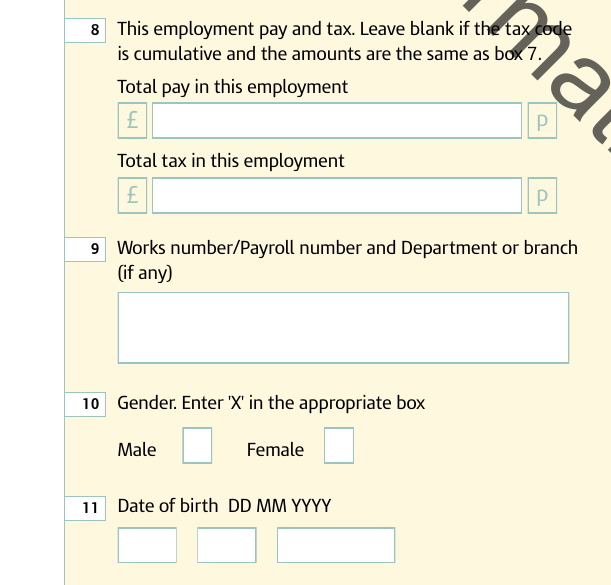
This employment pay and tax. Only used when box 7 includes a previous job: it isolates this employment's figures, and stays blank when identical to box 7.
Works/payroll number. Internal payroll identifier and department or branch, if any.
Gender. An 'X' in the relevant box.
Date of birth. DD MM YYYY.
Boxes 12 and 13: address and certification
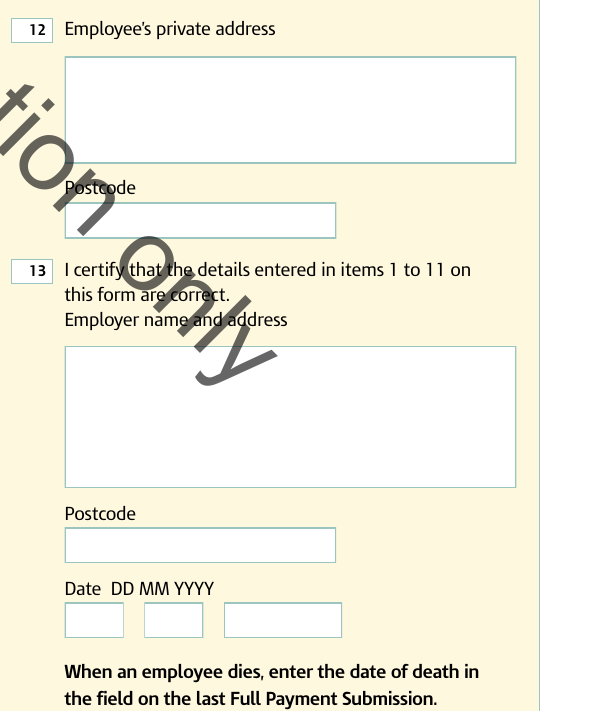
Employee's private address. Including postcode.
Employer certification. Name, address and date, certifying that boxes 1 to 11 are correct. Part 1A mirrors this layout, which is why the employee copy looks nearly identical.
Part 3, the final page of the full PDF, is completed by the new employer with boxes 8 to 18: their PAYE reference, the start date, a new works number, a 'P' flag if the employee will not be paid before the next 5 April, the tax code they will operate if it differs from box 6, the job title and their declaration. That information seeds the payroll record and goes to HMRC on their first FPS. Without Parts 2 and 3 the new employer falls back on the starter checklist, and the employee usually starts on an emergency code.
When an employer must issue a P45
An employer must give a P45 when an employee leaves [1]. The leaving date is entered in the payroll record at the final payment and reported on the next FPS, which is how HMRC learns that the employment has ended [8]. The employee receives Parts 1A, 2 and 3 at the same time.
There is no fee and no discretion involved. The duty to provide the form sits in the PAYE regulations, and an employee who does not receive one should ask the former employer directly [4]. For one-off or occasional payments where there is no ongoing employment to close, employers issuing a single instant payslip provide a payslip or written statement rather than a P45, because no leaving date applies.
What to do when there is no P45
A P45 cannot be reissued. If the form is lost, or an employer says it was sent but it never arrived, there is no duplicate to obtain [7]. The route in that case is the starter checklist, which the new employer uses to gather the details HMRC needs [10].
The starter checklist replaced the old P46 and asks the employee to confirm their circumstances through one of three starter declarations, which in turn set the starting tax code [11]. The table below summarises the three declarations and their effect.
| Declaration | Situation | Resulting tax code |
|---|---|---|
| A | This is the only job and there has been no other income since 6 April | Standard cumulative code |
| B | This is the only job, but there was other income earlier in the year | Standard code on a Week 1 / Month 1 basis |
| C | The employee has another job or pension alongside this one | Basic Rate code, no personal allowance |
Where the employee is unsure which applies, declaration B is the prudent default [11]. A new employer that receives neither a P45 nor a completed checklist before the first payday must still operate PAYE, applying an emergency code until the correct details arrive [3]. Software platforms that embed a UK payroll API handle this starter logic in code, mapping each declaration to the right code without manual intervention.
The P45, emergency tax and refunds
When a new employer has no P45 and no starter information, PAYE runs on an emergency basis. The emergency code carries the standard personal allowance but applies it on a non-cumulative footing, which can leave an employee paying more tax than they owe in the first weeks of a job [3]. Once the correct code reaches the employer, later payslips usually correct the position automatically.
Where an overpayment is not resolved through payroll, the employee can reclaim it from HMRC directly rather than from the employer [12]. Keeping Part 1A of the P45 helps here, because it provides the pay and tax record needed to check the position and, where relevant, complete a self-assessment return [2]. The P45 is therefore not just an onboarding document for the next employer; it is the employee's own proof of what was earned and deducted up to the leaving date.
Conclusion
The P45 is a small form with an outsized role. It closes one employment cleanly, opens the next on the right tax code, and gives the employee a record they may need months later for a refund or a tax return. Its four parts each have a job to do, and the year-to-date figures it carries are what keep PAYE accurate across a job change.
The form also sits at the centre of two of payroll's most common friction points: leavers reported late and starters onboarded without the right code. Getting the P45 right at the point of leaving, and knowing the starter-checklist route when one is missing, removes most of the emergency-tax problems that follow employees from one job to the next. For a year-end view of the same PAYE record, the end-of-year P60 checklist covers the certificate that follows the tax year rather than the job.
Frequently asked questions
Can an employer reissue a lost P45?
No. A P45 cannot be reissued once it has been lost, and there is no duplicate available from HMRC. The employee instead completes a starter checklist for the new employer, which gathers the same details HMRC needs to set the correct tax code. Keeping Part 1A of the original P45 safe avoids the problem in the first place.
How long does an employer have to provide a P45?
The employer must provide the P45 when the employee leaves. In practice the leaving date is entered at the final payment and reported on the next Full Payment Submission, and the employee receives Parts 1A, 2 and 3 at that point. The duty is a legal one under the PAYE regulations, so an employee who does not receive a P45 should ask the former employer.
What happens if a new job is started without a P45?
The new employer operates PAYE on an emergency tax code until the correct details arrive, which can mean overpaying tax for the first few pay periods. Completing a starter checklist promptly lets the employer apply the right code sooner. Any overpayment is usually corrected through later payslips, or reclaimed from HMRC directly if employment has ended.
Is a P45 the same as a P60?
No. A P45 is issued when an employee leaves a job during the tax year and shows pay and tax up to the leaving date. A P60 is an annual certificate given to employees still in post on 5 April, summarising the full tax year. The P45 supports a job change; the P60 is a year-end record often used for mortgage and loan applications.