
The UK tax year runs from 6 April to 5 April, and an employer must hand a P60 to every employee still on the payroll on 5 April by the 31 May that follows [1]. The P60 is a year-end certificate, so its dates are fixed to that cycle: it always summarises a single tax year from 6 April through to 5 April, never a calendar year and never a part-year [2].
Those two dates, the 5 April cut-off and the 31 May deadline, are the ones employers and employees ask about most. A P60 issued by 31 May covers the tax year that ended on the preceding 5 April, which is why the form is headed with the tax year it relates to rather than the date it was printed [2].
This guide sets out which tax year a P60 covers, where it sits in the wider year-end reporting timeline, and the related deadlines, the final payroll submission and the benefits return, that bracket it on either side.
Key takeaways
- The UK tax year runs 6 April to 5 April, and a P60 always covers one full tax year on that cycle [2].
- Employers must issue a P60 to every employee on the payroll on 5 April by 31 May that follows [1].
- The final Full Payment Submission is due on or before the last payday of the tax year, with a final report deadline of 19 April [3].
- A P60 issued by 31 May covers the tax year that ended on the previous 5 April, not the year in which it is printed [2].
- P60s may be issued on paper or electronically, and an electronic copy carries the same standing as a printed one [1].
Which tax year a P60 covers
The P60 is the End of Year Certificate, and the word "year" means the tax year, not the calendar year [2]. Every tax year in the UK begins on 6 April and ends on 5 April the following year, and the P60 captures the pay, tax and National Insurance for exactly that span [4].
Because the form is dated by the tax year it reports, a P60 reaching an employee in May relates to the year that closed weeks earlier on 5 April [1]. The figures are cumulative for that year, including any pay and tax carried over from a previous employment in the same year [5]. An employer running HMRC-recognised payroll software for SMEs generates the certificate straight from the year's payroll record, so the dates align automatically.
The 6 April to 5 April cycle
The 6 April to 5 April boundary is the anchor for almost every payroll date in the year [4]. Income tax thresholds and National Insurance limits are set per tax year on this cycle, which is why the standard personal allowance and the tax bands are quoted against a tax year rather than a calendar one [9].
For National Insurance, the same cycle governs the Lower Earnings Limit, the Primary Threshold and the Upper Earnings Limit that appear on the P60's NI section [10]. The certificate reports earnings against those bands for the single tax year, which keeps the document consistent with the figures HMRC holds [2].
Reading the tax year on the form
Each P60 is headed with the tax year it covers, expressed as the year ending 5 April [2]. That heading is the quickest way to confirm a certificate relates to the right period, because the issue date alone does not tell an employee which year the figures belong to [5].
The mapping between issue date and tax year is straightforward, and the table below shows how a P60 delivered in late spring lines up with the tax year that just ended.
Where the P60 sits in the year-end timeline
The P60 is one date in a short sequence of year-end obligations, and getting the order right keeps an employer compliant [4]. The sequence starts with the final payroll submission, moves to the P60, and finishes with the benefits return for any employer that provides taxable benefits [3]. The underlying payroll records that feed the certificate must be kept for three years after the end of the tax year they relate to [14].
The final Full Payment Submission is sent on or before the last payday of the tax year, with the field marking it as the final submission for the year [3]. Where that flag is missed, or no one was paid in the final period, the employer sends an Employer Payment Summary instead [7]. The table below sets out the core year-end dates in order.
| Date | Task | Applies to |
|---|---|---|
| On or before last payday | Final Full Payment Submission, flagged as final for the year [3] | All employers |
| 19 April | Deadline for the final payroll report for the tax year [3] | All employers |
| 31 May | Issue a P60 to every employee on the payroll on 5 April [1] | All employers |
| 6 July | P11D and P11D(b) for benefits in kind [4] | Employers providing benefits |
Software that holds the HMRC Recognised badge sequences these submissions and produces the P60 from the same record set, which removes the risk of a mismatch between the final Full Payment Submission and the certificate [8]. A platform embedding payroll through an HMRC-recognised payroll API can drive the whole year-end sequence programmatically [15]. Accountants running year-end across many client schemes typically rely on a multi-client payroll dashboard to track each deadline per employer.
Who must receive a P60
The 5 April test is about employment status on that single day, not hours or pay frequency [1]. Every individual employed on 5 April receives a P60, including those on maternity, paternity or sickness absence, and directors on the payroll [1]. A worker who left before 5 April does not get a P60 from that employer, because they will already have received a P45 on leaving [5].
For a small business payroll with a single director, this still applies: a director on the payroll on 5 April is entitled to a P60 like any other employee [1]. Even an occasional employer issuing a one-off HMRC-compliant payslip reaches the same year-end position if the worker remains on the payroll at the cut-off.
Employees rely on the certificate well beyond payroll. The P60 is the standard proof of annual income for a Self Assessment return [11], a claim for overpaid tax [13] and a mortgage application [6]. That downstream use is why year-end accuracy matters, and the discipline behind it is set out in a separate P60 end of year checklist.
Where the tax year appears on the form
The certificate states the year it covers in its header, which is the fastest way to confirm you are holding the right one. This is the official 2026-27 form.
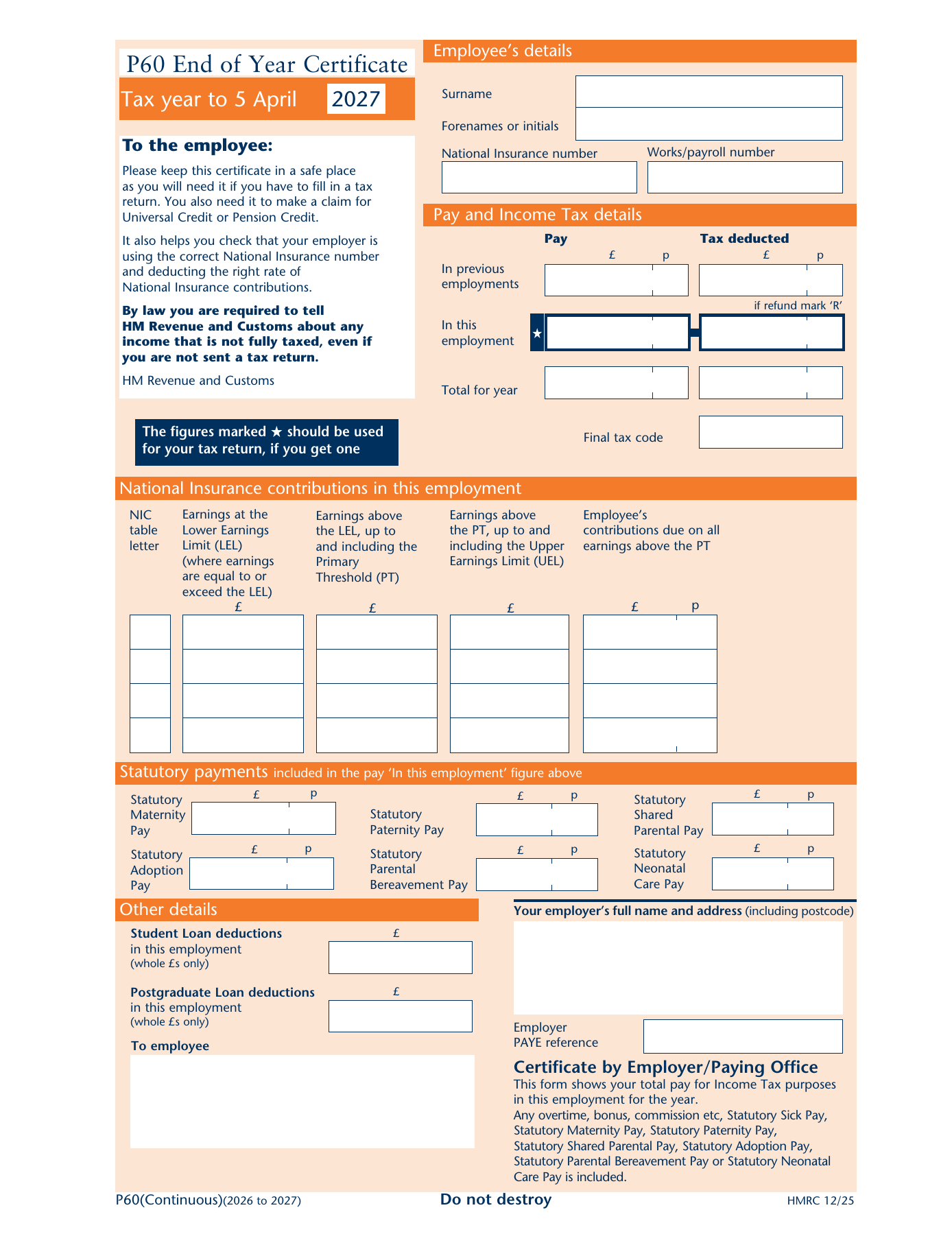
Employee details. Name, National Insurance number, works number and the tax code at the end of the year.
Pay and Income Tax. Pay and tax in this employment, plus anything carried in from a previous job in the same year.
National Insurance. Earnings by NI letter, split across the lower earnings limit, primary threshold and upper earnings limit.
Statutory payments. Maternity, paternity, adoption and shared parental pay, then the employer’s certificate.
Each zone of the certificate is explained in turn in What is a P60?.
Conclusion
The P60's dates are not arbitrary. They hang off the 6 April to 5 April tax year, which fixes both what the certificate covers and when it must be issued. A P60 in hand by 31 May reports the year that closed on the preceding 5 April, and it sits between the final payroll submission that precedes it and the benefits return that follows for employers with taxable benefits.
For payroll teams, the practical discipline is to treat 5 April as the line that decides who gets a certificate, and 31 May as the deadline that cannot slip. The wider move towards real-time reporting means the year's figures are already filed by the time the P60 is produced, so the certificate is a summary of submissions HMRC has seen rather than a fresh calculation. Year-end is increasingly a confirmation step, not a reconciliation, when the payroll record is accurate throughout the year.
Frequently asked questions
What tax year does a P60 cover?
A P60 covers one full UK tax year, which runs from 6 April to 5 April [2]. The certificate is headed with the tax year it relates to, expressed as the year ending 5 April, so a P60 received in spring reports the year that ended weeks earlier rather than the year in which it is issued [1]. It never covers a calendar year.
When is the P60 deadline each year?
Employers must issue a P60 to every employee on the payroll on 5 April by 31 May that follows [1]. That deadline is the same every year because it is tied to the fixed tax year cycle [4]. The P60 can be provided on paper or electronically, and an electronic copy has the same standing as a printed one [1].
Does an employee who left during the year get a P60?
No. A P60 only goes to employees still on the payroll on 5 April, the last day of the tax year [1]. A worker who left earlier in the year will already have received a P45 on leaving, which carries their pay and tax figures to the leaving date [5]. For the new job, those figures are continued by the next employer.
What if a P60 is lost?
HMRC does not issue a duplicate P60, because the certificate always comes from the employer [6]. An employee who loses one should ask their employer for a replacement copy [6]. Where that is not possible, the same pay and tax figures can be viewed through a Personal Tax Account, which is widely accepted as proof of income [12].
The current certificate covers the tax year to 5 April 2027. See every box explained in our P60 guide, with the official HMRC form (PDF) to download.