
A P45 is issued the moment an employee leaves a job; a P60 arrives by 31 May for everyone still employed on 5 April, the last day of the tax year [1]. The two forms look similar, both summarise pay and tax, and both come from the employer's payroll, which is exactly why they are so often confused.
The difference matters in practice. A new employer needs the P45 to put a starter on the right tax code from the first payday [2]. A mortgage lender, by contrast, wants the P60, because it certifies a complete tax year. Handing over the wrong form delays both processes.
This article sets out what each form shows, when each one is issued, how they work together across a job change, and what happens when one of them goes missing.
Key takeaways
- The P45 records pay and tax from 6 April to the date an employee leaves a job; the P60 records the full tax year for anyone employed on 5 April [1].
- An employer must issue the P45 when the employment ends, and the P60 by 31 May following the tax year end [3].
- The P45 travels to the next employer; the P60 stays with the employee as proof of income.
- A lost P60 can be reissued by the employer as a duplicate, but a lost P45 cannot be replaced; the starter checklist takes its place [4].
- An employee who changes jobs mid-year can receive both forms in the same tax year, a P45 from the old employer and a P60 from the new one.
What each form is
Both documents sit inside the PAYE system, under which the employer deducts Income Tax and National Insurance before paying wages [5]. Each form marks a different event in the employment lifecycle.
The P45: issued when an employee leaves
The P45, formally titled Details of employee leaving work, is issued whenever an employment ends, whatever the reason: resignation, redundancy, dismissal or retirement [6]. It shows the leaving date, the tax code in use at departure, and the total pay and tax deducted from 6 April up to the final payday [2].
The form comes in numbered parts. Part 1 goes to HMRC, today transmitted electronically through the Full Payment Submission rather than by post [6]. The employee receives Parts 1A, 2 and 3: Part 1A is for the employee's own records, while Parts 2 and 3 are handed to the next employer [2].
The P60: issued at the end of the tax year
The P60, the End of Year Certificate, goes to every employee still on the payroll on 5 April, with a statutory deadline of 31 May [3]. It certifies the full year: total pay, total tax, National Insurance by earnings band, statutory payments and student loan deductions [7]. An employee with two simultaneous jobs receives one from each employer. A fuller breakdown of every field appears in the guide to the P60 and what the certificate shows.
The two forms side by side
The clearest way to separate them is to look at them. The P45 records a leaving date and the totals up to it, on a four-part form. The P60 certifies a whole tax year, on a single sheet issued by 31 May.
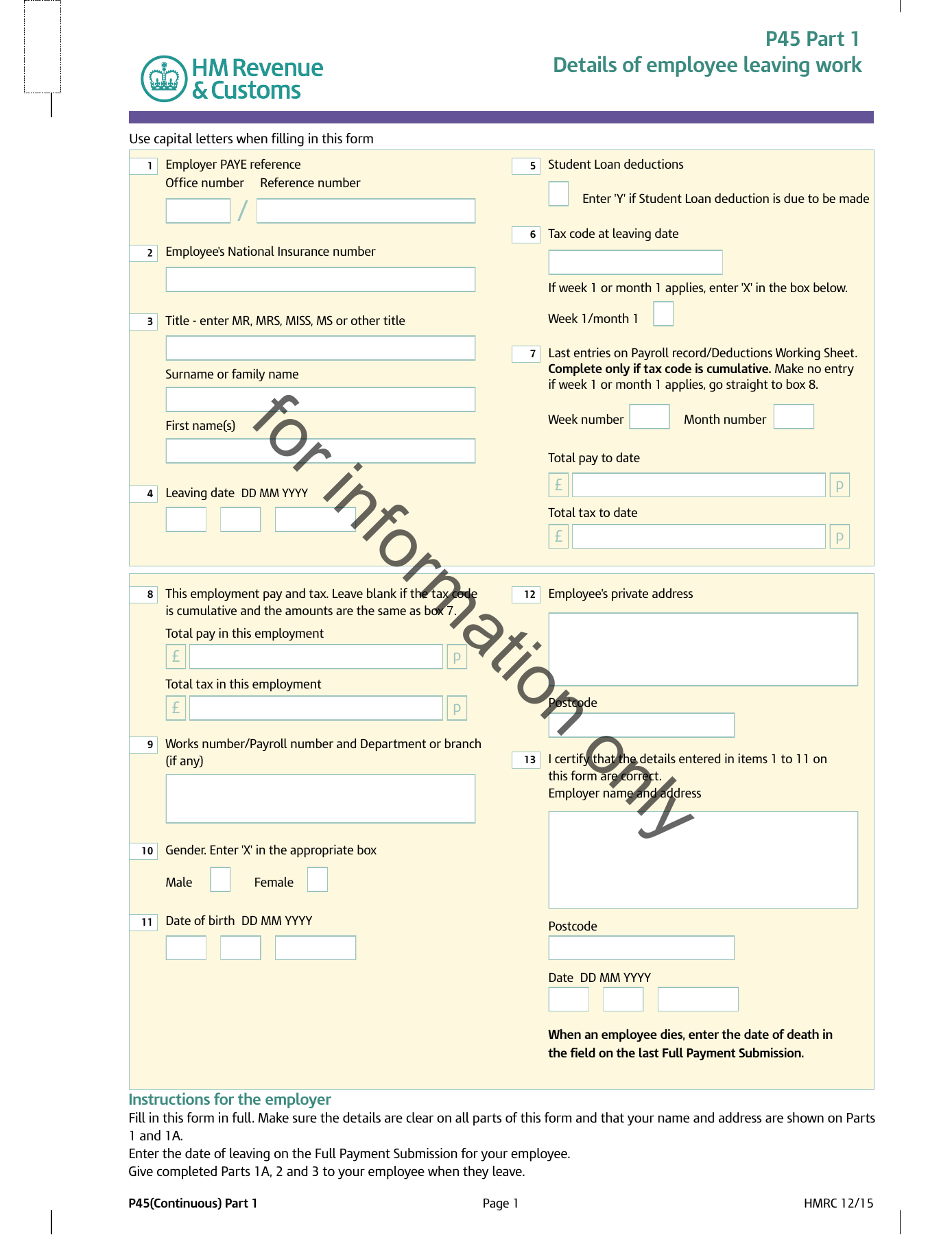
Boxes 1 to 4. Employer PAYE reference, National Insurance number, the employee’s name and the leaving date.
Boxes 5 to 7. The tax code in use at leaving, and whether it runs on a week 1 or month 1 basis.
Boxes 8 to 11. Total pay and total tax to date, and the same figures for this employment only.
Boxes 12 and 13. The employee’s address and the employer’s certification of the figures.
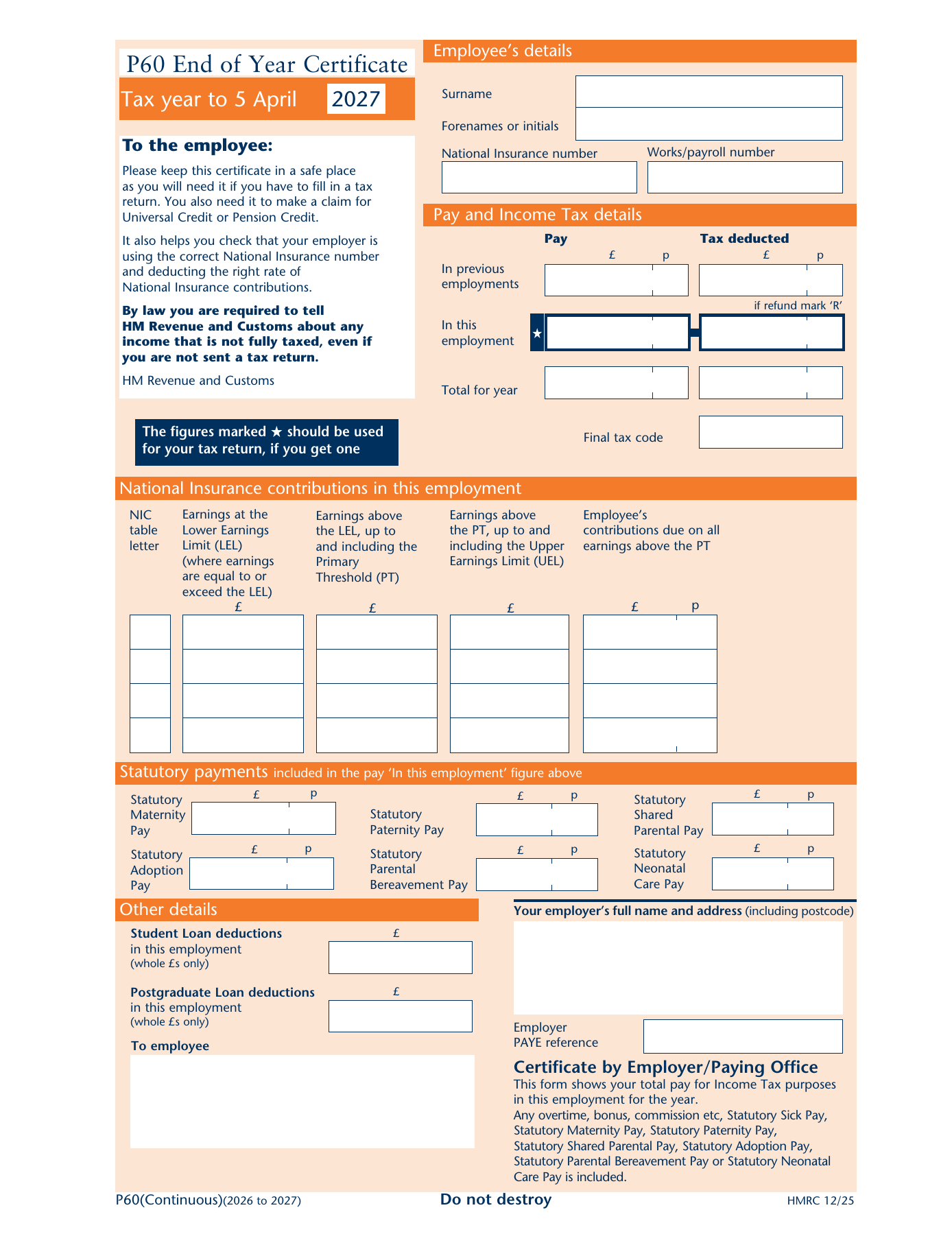
Employee details. Name, National Insurance number, works number and the tax code at the end of the year.
Pay and Income Tax. Pay and tax in this employment, plus anything carried in from a previous job in the same year.
National Insurance. Earnings by NI letter, split across the lower earnings limit, primary threshold and upper earnings limit.
Statutory payments. Maternity, paternity, adoption and shared parental pay, then the employer’s certificate.
Each form is taken box by box, with a zoom on every zone, in What is a P45? and What is a P60?.
P45 vs P60 side by side
The table below puts the two forms next to each other on the points that matter most.
| Aspect | P45 | P60 |
|---|---|---|
| Trigger | Leaving a job | Being employed on 5 April |
| Period covered | 6 April to the leaving date | The full tax year |
| Deadline | On or shortly after leaving | 31 May following year end |
| Main user | The next employer | The employee |
| Frequency | Once per employment ending | Once per year, per job |
| If lost | Cannot be replaced; starter checklist used instead [4] | Employer can issue a duplicate [4] |
One person can hold both forms for the same tax year. Someone who leaves a job in October and starts a new one in November receives a P45 from the first employer, and the following spring a P60 from the second, with the October figures carried into the P60's previous-employment column [3].
How the two forms work together across a job change
The P45 and P60 are two links in the same chain. The accuracy of the year-end P60 depends on what happened with the P45 months earlier.
What the new employer does with a P45
The new employer takes Parts 2 and 3 of the P45 and uses the tax code and year-to-date figures to continue deductions seamlessly [2]. The starter's details then flow to HMRC in the next Full Payment Submission [8]. Modern payroll software for SMEs reads the P45 entries at onboarding and carries the cumulative figures forward automatically, which is what keeps the eventual P60 accurate.
When there is no P45: the starter checklist
A starter without a P45 completes HMRC's starter checklist instead, choosing one of three statements that determine the starting tax code [9]. With neither document in place by the first payday, the employer must apply an emergency basis, deducting tax with no regard to earlier earnings in the year until HMRC issues the correct code [10]. The table below summarises the three statements.
| Starter checklist statement | Situation | Resulting tax code |
|---|---|---|
| A | First job since 6 April | 1257L cumulative |
| B | Has had another job since 6 April | 1257L, week 1/month 1 basis |
| C | Has another job or pension | BR |
The 1257L code reflects the standard Personal Allowance of £12,570 [11].
What employers must get right
For the employer, both forms are legal obligations rather than courtesies, rooted in the PAYE Regulations [12]. A leaver's P45 must be issued when the employment ends, and the leaving date must reach HMRC in the correct Full Payment Submission; reporting it late or twice is one of the most common causes of duplicate employment records at HMRC [6]. At year end, every employee on the books on 5 April needs a P60 by 31 May, on paper or electronically [7].
Payroll software that carries the HMRC Recognised badge generates both forms from the same real-time data already reported to HMRC, so the P45 a leaver receives and the P60 a stayer receives reconcile with HMRC's records by design. Accountants running leavers and year end across many client schemes manage the cycle from a multi-client payroll dashboard, while platforms that embed payroll generate P45s and P60s programmatically through a payroll API. Smaller employers can find the same compliance built into payroll for SMEs.
Conclusion
The P45 and the P60 answer two different questions. The P45 answers "what has this person earned and paid so far this tax year?", a question only the next employer really needs answered. The P60 answers "what did this person earn and pay across the whole year?", the question lenders, HMRC and the employee's own records all rely on.
As payroll moves deeper into real-time, both forms are increasingly by-products of data HMRC already holds, generated automatically the moment an employment ends or a tax year closes. The forms persist because people and institutions still need a document to hold, but the underlying truth now lives in the payroll submission itself.
Frequently asked questions
Can someone get both a P45 and a P60 in the same tax year?
Yes. Anyone who changes jobs during a tax year receives a P45 from the employer they leave, and a P60 the following spring from the employer they are with on 5 April. The P60 from the new employer includes the previous employment's pay and tax, so the two documents overlap deliberately rather than contradicting each other.
Can a lost P45 be replaced?
No. Neither the employer nor HMRC can issue a duplicate P45. A new starter who has lost theirs completes HMRC's starter checklist instead, which lets the new employer set an appropriate tax code. Any overpaid tax that results from a temporary code is corrected automatically once HMRC issues the right one.
Does a P45 expire?
A P45 is only valid for the tax year in which it was issued. A new employer should not use a P45 from a previous tax year to set a tax code, because the year-to-date figures on it no longer apply. In that situation the starter checklist is used instead, exactly as if there were no P45 at all.
Why does a P60 show pay from a previous employment?
When a new starter hands in a P45, the figures on it are carried into the new employer's payroll so tax stays cumulative across the year. At year end those figures appear on the P60 in the previous-employments boxes, alongside the pay and tax from the current employment, so the certificate totals the entire tax year across all jobs held in sequence.
For the full anatomy of each form, every box explained with the official HMRC PDFs to download, see our guides to what is a P45 and what is a P60.