
The P45 is a PAYE form that every UK employer must issue to an employee the moment they leave a job [1]. It records total pay and income tax from 6 April to the leaving date, the tax code in force at departure, and the employee's National Insurance number. The new employer uses those figures to continue the employee's PAYE record without a break, avoiding the emergency tax codes that arise when the year-to-date position is unknown.
The P stands for Pay As You Earn. The 45 is the reference number HMRC has assigned to this particular form within the PAYE document series, just as the P60 is the end-of-year certificate and the P11D reports benefits in kind [8]. Together the P45 and P60 cover the two main transition points in an employee's tax year: leaving a job and reaching the year end.
Key takeaways
- A P45 is issued whenever an employee leaves, covering pay and tax from 6 April to the leaving date [1].
- The P45 has three parts. Part 1A goes to the employee; Parts 2 and 3 go to the new employer [3].
- Under Real Time Information, the leaving date and year-to-date figures are also submitted to HMRC via the employer's Full Payment Submission [2].
- A lost P45 cannot be replaced. The employee uses the starter checklist at the next employer instead [6].
The P45 in PAYE
PAYE (Pay As You Earn) is the system HMRC uses to collect income tax and National Insurance from employment income at source [10]. Employers deduct income tax from each payslip using a tax code assigned by HMRC, then report each payment to HMRC via the Real Time Information system [15].
The P45 is the mechanism that moves an employee's year-to-date PAYE record from one employer to the next. Without it, the new employer starts with no knowledge of how much the employee has earned or paid in tax since 6 April. The default in that situation is an emergency tax code, which can result in the employee paying the wrong amount of tax until HMRC corrects the position [10].
Who issues a P45 and when
The departing employer issues the P45, generated by payroll software, at the point of the final pay run [3]. The leaving date and cumulative pay and tax figures are included in the Full Payment Submission sent to HMRC on or before the final payday [2]. The P45 handed to the employee contains the same information.
The employer must issue a P45 for every employee who leaves, regardless of the reason for departure, the length of service, or the contract type [1]. This applies equally to employees who resign, are made redundant, reach the end of a fixed-term contract, or are dismissed.
P45 vs P60
The P45 and P60 cover different events in the employment lifecycle. What a P60 is is a related question that often arises alongside the P45, and the two documents are compared in the table below:
| Feature | P45 | P60 |
|---|---|---|
| Issued when | Employee leaves a job | End of tax year (31 May deadline) [[11]](https://www.gov.uk/payroll-annual-reporting/give-employees-p60-form) |
| Covers | 6 April to the leaving date | Full tax year (6 April to 5 April) [[9]](https://www.gov.uk/government/publications/cwg2-further-guide-to-paye-and-national-insurance-contributions/2026-to-2027-employer-further-guide-to-paye-and-national-insurance-contributions) |
| Who receives it | Employee who has left | Every employee still employed on 5 April [[5]](https://www.gov.uk/guidance/rates-and-thresholds-for-employers-2026-to-2027) |
| Can it be replaced? | No [[6]](https://www.gov.uk/paye-forms-p45-p60-p11d/lost-paye-forms) | Yes, employer can reissue; HMRC personal tax account also holds the data |
| Used by new employer? | Yes, to continue the PAYE record | No |
An employee can receive a P45 and a P60 from the same employer in the same tax year only if they left before 5 April and then rejoined before that date. In practice the two documents are issued by different events and are not issued simultaneously for the same period.
The Information on a P45
For the leaving employee
The P45 gives the employee a formal record of their employment earnings and tax position up to the date of departure [1]. The key fields the employee sees on Part 1A are:
- Their full name, National Insurance number and date of leaving.
- The tax code in use at departure, such as `1257L` or `BR`, and whether it was applied cumulatively or on a Week 1/Month 1 basis [13].
- Total pay in this employment from 6 April to the leaving date.
- Total income tax deducted in this employment from 6 April to the leaving date.
- An indication of whether student loan deductions were in progress and, if so, which plan [14].
The employee may need the P45 for a mortgage or rental application, or when filing a Self Assessment return for the tax year in which they changed jobs. For the year-end certificate that covers the full tax year at the new employer, they will receive a P60 instead.
For the incoming employer
When an employee provides their P45 to a new employer, the new employer enters the year-to-date pay and tax figures into the payroll software for the pay period in which the employee joins [4]. The software then calculates future deductions cumulatively from that starting position, using the tax code shown on the P45 unless HMRC issues an updated code.
The new employer must use the P45 from the current tax year only [4]. A P45 that predates 6 April of the current year cannot be used for cumulative figures, because those figures reset at the start of each tax year. The employee completes the starter checklist in that situation, and the new employer assigns an opening tax code from the declaration made on that form.
The form itself, box by box
The definitions land better against the document. This is Part 1 of the official P45, where each figure discussed above physically sits.
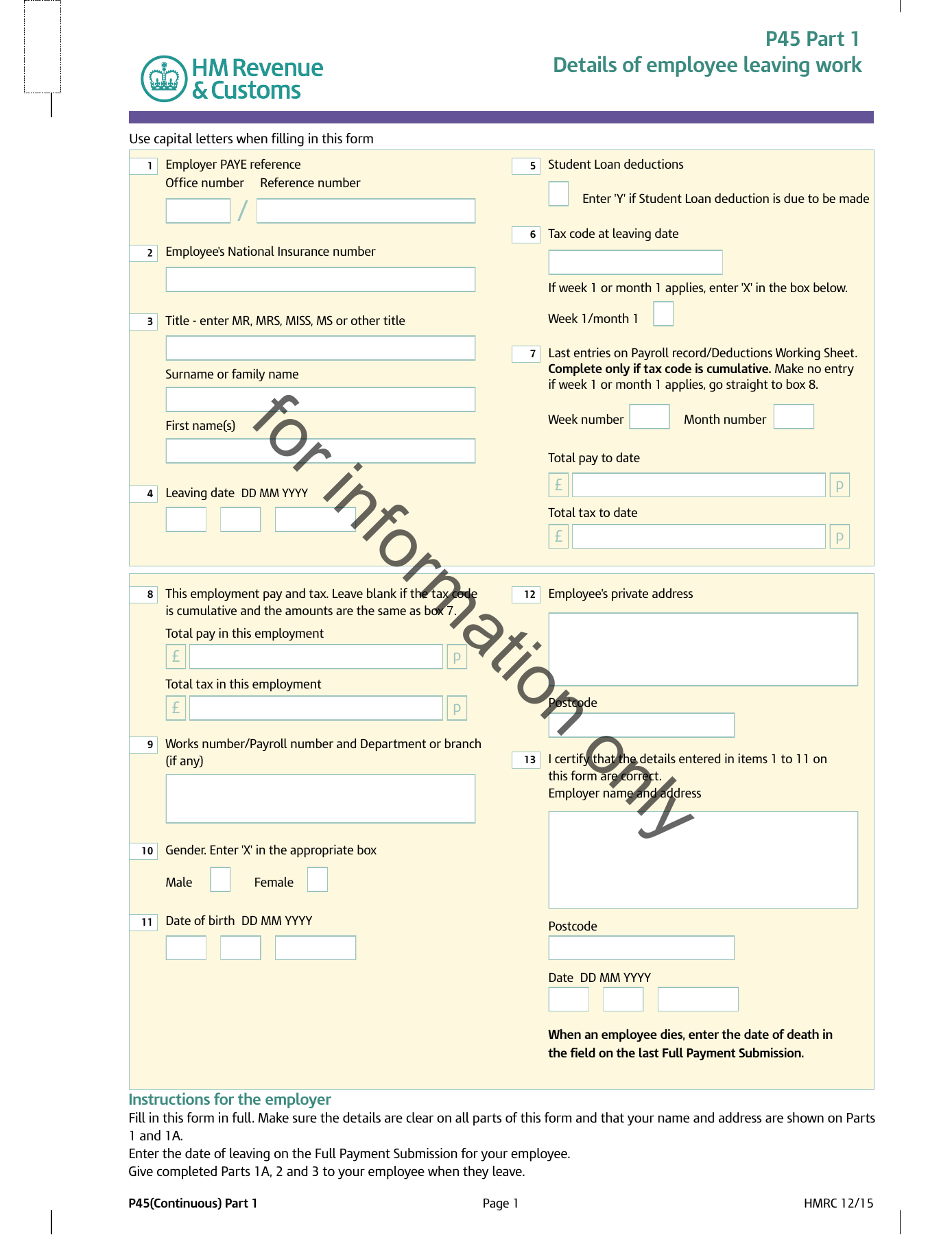
Boxes 1 to 4. Employer PAYE reference, National Insurance number, the employee’s name and the leaving date.
Boxes 5 to 7. The tax code in use at leaving, and whether it runs on a week 1 or month 1 basis.
Boxes 8 to 11. Total pay and total tax to date, and the same figures for this employment only.
Boxes 12 and 13. The employee’s address and the employer’s certification of the figures.
For a zoom on each zone and a line on every numbered box, see What is a P45?.
The Starter Declaration as an Alternative
Declarations A, B and C
Where an employee has no P45 (first job, re-entry to employment, lost document), the new employer uses the starter checklist to gather the information needed to assign a tax code [4]. The employee makes one of three declarations about their employment history since 6 April:
| Declaration | Employee's situation | Opening tax code |
|---|---|---|
| A | This is their first job this year, no other taxable income received | 1257L, cumulative basis [[12]](https://www.gov.uk/income-tax-rates) |
| B | Only current job, but had prior employment or taxable benefits this year | 1257L, Week 1/Month 1 basis |
| C | Has another job in addition to this one | BR (Basic Rate on all earnings) [[13]](https://www.gov.uk/tax-codes) |
Declaration A produces the most favourable tax code. Declaration C applies Basic Rate tax to all earnings in this employment with no Personal Allowance, because the allowance is assumed to be used by the main job. HMRC will issue a corrected code once its records are updated through the first Full Payment Submission containing the new employee [16].
The starter checklist is not a replacement document with the same status as a P45. It is the designed fallback mechanism within the PAYE system for employees who arrive without one. HMRC-recognised payroll software supports all three starter declarations natively and reports the chosen declaration to HMRC in the first FPS.
Accountants managing onboarding across multiple client schemes can handle both P45 and starter checklist scenarios through a payroll bureau platform that applies the correct opening tax treatment automatically based on the information provided. The Moonworkers payroll API exposes both pathways for platforms that handle new-starter onboarding programmatically.
Conclusion
The P45 is the PAYE form that keeps the employment tax record continuous across job changes. Its meaning is straightforward: a record of what the employee earned and paid in tax in this employment, passed forward so the next employer and HMRC can pick up without a break. The accuracy of that record depends on the accuracy of the payroll that generated it.
For employees and employers alike, the P45 sits within a broader framework of annual PAYE documents, complemented by the starter checklist at joining and the P60 at year end.
Frequently asked questions
What does P45 stand for?
The P in P45 stands for Pay As You Earn, the UK system for collecting income tax at source from employment income [10]. The number 45 is HMRC's internal form reference within the PAYE document series. P60 and P11D follow the same naming convention.
Is a P45 still required under Real Time Information?
The employer's obligation to issue a P45 remains in force under RTI [1]. What changed under RTI is that the Part 1 information, formerly posted to HMRC, now travels via the Full Payment Submission [2]. The employee still receives Parts 1A, 2 and 3 in the same way as before.
What happens if an employer does not issue a P45?
Failing to issue a P45 is a breach of PAYE regulations [1]. The employee is left without the year-to-date figures they need to avoid emergency tax at the next employer. The employee can report the failure to HMRC, which will contact the former employer. In the meantime, the new employer uses the starter checklist to establish an opening tax code [4].
Do sole traders or the self-employed receive a P45?
A P45 is a PAYE document. Sole traders and purely self-employed workers are not in the PAYE system and do not receive P45s [8]. Their income is reported through Self Assessment. A person who moves from employment (PAYE) to self-employment would receive a P45 from their last employer when leaving that employment, even if they go on to operate outside PAYE thereafter.
Curious what every numbered box means in practice? Our box-by-box P45 guide walks through all four parts, with the official HMRC form (PDF) to hand.