
A P45 form records an employee's pay, Income Tax and tax code for one job up to the day they leave, and the duty to provide it sits in regulation 36 of the Income Tax (PAYE) Regulations 2003 [1]. The form prints in four parts, each with a different destination, and a new employer uses it to deduct the right tax from the very first payday rather than applying an emergency code [2].
Despite its short length, the P45 carries more weight than most payroll paperwork. It is the bridge between two jobs, the evidence behind a benefits claim, and a record that decides whether a new starter is taxed correctly or overtaxed for weeks. Understanding what the form contains, and what each part is for, explains why it matters so much.
Key takeaways
- A P45 is issued by the employer when an employee leaves, recording pay and tax for the year to the leaving date [3].
- It prints in four parts: Part 1 goes to HMRC, and Parts 1A, 2 and 3 go to the employee [2].
- A new employer uses Parts 2 and 3 to set the correct tax code from day one [4].
- Without a P45, a starter checklist and a temporary tax code apply until HMRC reconciles the record [5].
What a P45 form is
A P45 is the document an employer produces when an employee stops working for them. Its formal title is 'Details of employee leaving work', and it certifies how much the employee earned and how much Income Tax was deducted from 6 April up to the leaving date, alongside the tax code in use [2]. It is specific to one employment, so a person with two jobs who leaves one still receives a P45 for that job alone [3].
The form is not a year-end document. That role belongs to the P60, which every employee still on the payroll on 5 April receives by 31 May [3]. The P45 instead captures a part-year, ending whenever the employment does. Anyone who needs to obtain a missing one can follow the guide on how to get a P45.
The four parts of a P45 and where each goes
The single most misunderstood feature of the form is that it comes in four parts, each with a separate recipient. The employer sends Part 1 to HMRC through Real Time Information and hands the other three parts to the leaver [3]. Copies of Part 1A are not available afterwards, which is why the employee is told to keep it safe [2].
| Part | Destination | Purpose |
|---|---|---|
| Part 1 | Employer sends it to HMRC | Reports the leaver's final pay and tax [7] |
| Part 1A | Employee keeps it | A personal record that cannot be reissued [2] |
| Part 2 | Given to a new employer | Sets up the new payroll record [8] |
| Part 3 | Given to a new employer | Returned by them to HMRC to register the new job [8] |
A leaver who starts a new job hands Parts 2 and 3 to the new employer and keeps Part 1A [2]. A leaver who claims benefits instead gives Parts 2 and 3 to Jobcentre Plus, again keeping Part 1A for their own records [6].
What information a P45 records
The figures on a P45 are what make it useful, because they let the next employer continue the tax calculation rather than start from scratch. The form's 'Total pay to date' shows gross pay across all PAYE jobs in the tax year so far, and 'Total tax to date' shows the Income Tax deducted against it [7].
| Field | What it records |
|---|---|
| Leaving date | The last day of the employment [3] |
| Tax code | The code in use at leaving, and whether it was cumulative [7] |
| Total pay to date | Gross pay for the tax year across PAYE jobs [1] |
| Total tax to date | Income Tax deducted in the year so far [2] |
| National Insurance number | The employee's NI number [2] |
| Student loan indicator | Whether loan deductions should continue [4] |
The form deliberately omits National Insurance totals for the year, because NI is recalculated each pay period and does not carry across jobs the way Income Tax does. That difference is one reason the P45 and the year-end P60 are not interchangeable.
How a new employer uses a P45
The cumulative basis explained
A new employer feeds the P45 figures into payroll so the tax calculation picks up exactly where the previous job left off. Where Parts 2 and 3 show the cumulative basis was used, the employer deducts or repays tax against the code shown, taking the year-to-date pay and tax into account [7]. This is what stops a job change from disrupting an employee's tax position.
The new employer must ask for Parts 2 and 3 before the first payday and keep them on file [8]. Employers retain that starter information for the current tax year and the three following years, so the record supports any later HMRC query [12].
When there is no P45: the starter checklist and emergency tax
If a new starter has no P45, the employer uses a starter checklist, the document that replaced the old P46, to determine the right starting tax code [5]. The checklist captures whether the job is the person's only employment and whether a student loan is outstanding, and the employer applies a tax code based on those answers [4].
Until the correct code is confirmed, an emergency code may apply, taxing each pay period in isolation rather than cumulatively [9]. HMRC usually issues the right code once it has details from both the old and new employers, after which payroll recalculates and refunds any overpayment automatically [9]. An employee can check or chase this through the Check your Income Tax service [10].
The P45 beyond a new job
The form is not only for the next employer. A person leaving work to claim benefits gives Parts 2 and 3 to Jobcentre Plus, which uses them to assess the claim and to make sure any taxable benefit is taxed correctly [6]. The P45 also serves as supporting identity and income evidence in that process.
For anyone owed a refund, the P45 documents tax paid in the part-year and feeds a reclaim, whether through Self Assessment or a direct HMRC check [11]. Where the form is lost, the figures still exist in HMRC's records and can be retrieved as a statement of employment history, which most bodies accept in its place [14].
When and how a P45 is issued
An employer must produce a P45 whenever an employee leaves, recording the leaving date on the final Full Payment Submission and generating the form from the same payroll data [7]. The timing is set by law: the form is due on the day employment ends, or without unreasonable delay where same-day issue is not practicable [1].
Once issued, the form cannot be reissued, because a second P45 would corrupt the tax record HMRC builds from Real Time Information [11]. Where pay falls due after the P45 has gone out, such as accrued holiday, the employer keeps the original and taxes the later payment under code 0T, flagged as a payment after leaving rather than printed on a new certificate [7].
The employer's side of producing a P45
For the employer, the P45 is an automatic output of the leaving process, generated from data already filed rather than completed by hand [7]. Software carrying the HMRC Recognised badge produces every part correctly and reports Part 1 through Real Time Information, which is why UK payroll software turns a leaver's final payday into a routine step even for a one-person company paying a single director.
The same accuracy matters on the receiving end, where a P45's figures must flow into a new starter's record without error [8]. Bureaux processing starters and leavers across many client schemes run the work from a payroll platform built for accountants, and platforms that embed payroll into their own products handle every P45 programmatically through an HMRC-recognised payroll API.
What the P45 form looks like
The four parts described above all carry the same layout. This is Part 1 of the official form, the copy the employer holds, with the boxes grouped the way HMRC numbers them.
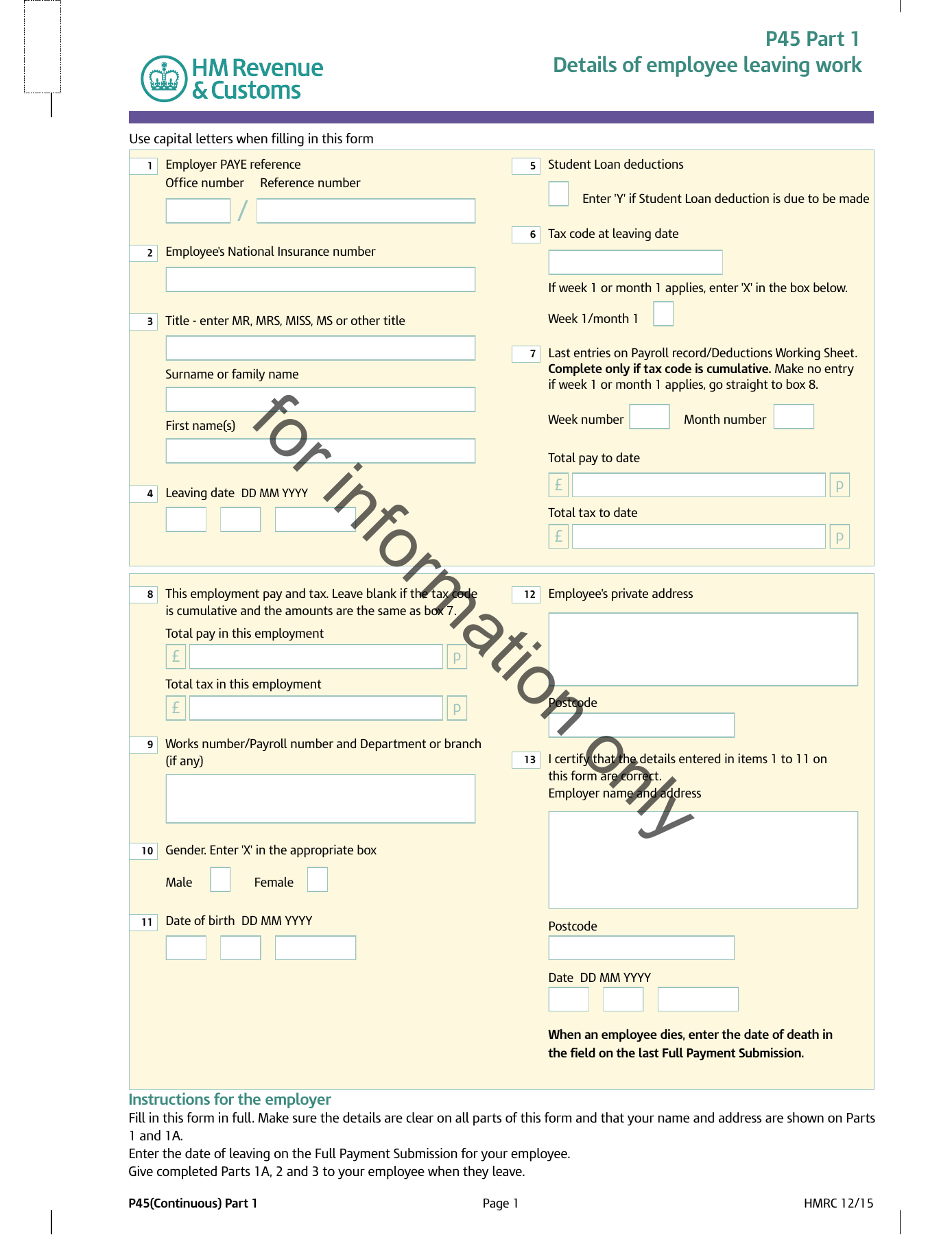
Boxes 1 to 4. Employer PAYE reference, National Insurance number, the employee’s name and the leaving date.
Boxes 5 to 7. The tax code in use at leaving, and whether it runs on a week 1 or month 1 basis.
Boxes 8 to 11. Total pay and total tax to date, and the same figures for this employment only.
Boxes 12 and 13. The employee’s address and the employer’s certification of the figures.
Every box is taken one at a time, with a zoom on each zone, in What is a P45?.
Conclusion
The P45 form is small but pivotal. It records a part-year of pay and tax, splits into four parts with four destinations, and lets a new employer or Jobcentre Plus continue an employee's tax position without disruption. Read in full, it explains why a clean handover between jobs depends on a single document being issued on time and passed to the right place.
The longer trend is towards the data behind the form rather than the paper itself. As Real Time Information keeps HMRC's record current between jobs and statements of earnings stand in for lost certificates, the P45 is becoming one expression of a continuous tax record rather than the only link in the chain, even as its role at the moment of leaving stays firmly in place.
Frequently asked questions
What is the difference between a P45 and a P60?
A P45 is issued when an employee leaves a job and covers pay and tax for that employment up to the leaving date. A P60 is issued at the end of the tax year to every employee still on the payroll on 5 April and summarises the whole year for that job. In short, the P45 marks an ending and the P60 marks a year-end, so a single tax year can produce both for different employments.
Which parts of a P45 go to a new employer?
Parts 2 and 3. The employee keeps Part 1A as their own record, and the former employer has already sent Part 1 to HMRC. The new employer uses Parts 2 and 3 to set the correct tax code and continue the year-to-date calculation, then returns Part 3 to HMRC to register the new employment. A leaver claiming benefits gives Parts 2 and 3 to Jobcentre Plus instead.
Does a P45 show National Insurance contributions for the year?
No. The P45 records total pay and total Income Tax for the year to the leaving date, along with the tax code and National Insurance number, but it does not carry a running National Insurance total. National Insurance is recalculated each pay period and does not transfer between jobs the way cumulative Income Tax does, which is one of the practical differences between the P45 and the year-end P60.
What happens to the tax code if a new starter has no P45?
The employer uses a starter checklist to work out a starting tax code from the employee's answers about other jobs, pensions and student loans. An emergency code may apply at first, taxing each pay period on its own rather than cumulatively. Once HMRC has details from both employers it issues the correct code, and payroll recalculates the year so far, refunding any overpaid tax through the next wage.
For a field-by-field walkthrough of all four parts of the form, boxes 1 to 18, see what is a P45, and download HMRC's official P45 specimen (PDF) to follow along.