
Every employee on a UK payroll on 5 April must receive a P60 by 31 May, and HMRC itself never issues the form: it always comes from the employer [1]. That single fact decides every route to getting one, whether the certificate is late, lost, or needed from a job left years ago.
The P60 certifies a full tax year of pay, Income Tax and National Insurance for one employment, and is routinely requested for mortgage applications, tax refund claims and Self Assessment returns [2]. What the certificate contains line by line is covered in the companion guide comparing the P45 and the P60; this article deals with the practical question of how to obtain one.
Key takeaways
- The employer issues the P60, on paper or electronically, by 31 May following the tax year end [3].
- HMRC cannot send a replacement P60; a lost certificate is reissued by the employer as a duplicate [4].
- The same figures are available free through a Personal Tax Account or the HMRC app, covering the current and previous five tax years [5].
- An employee who left a job before 5 April gets no P60 for that employment; the P45 covers the part year instead [6].
Who gets a P60 automatically
No application is needed for a current job. Anyone employed on 5 April, the final day of the tax year, must be given a P60 by their employer by 31 May, whether they work full time, part time or as a director paid once a year [3]. An employee holding two jobs at once receives a separate certificate from each employer [1].
The one group that never receives a P60 is leavers. Someone who left an employment before 5 April relies on the P45 issued at departure, and if they started a new job before the year end, the new employer's P60 includes the earlier figures [6].
Getting a P60 from an employer
From a current employer
If 31 May has passed and no P60 has arrived, the payroll department or whoever runs the payroll is the first call. Employers may issue the certificate on paper or electronically, and many deliver it through the same portal as payslips, where it can sit unnoticed [1]. An employer who persistently fails to provide one can be reported to HMRC, and ACAS advises raising the matter formally with the employer first [7].
From a previous employer
A lost P60 is requested from the employer who issued it, who can provide a duplicate [4]. Employers must keep their PAYE records for at least three years after the end of the tax year they relate to, so a duplicate for a recent year is usually straightforward [8]. Where the employer has closed down or cannot be reached, the form itself is gone, but the figures on it are not, which is where HMRC's online services take over.
Getting the figures without the form
HMRC holds the underlying pay and tax data for every PAYE employment, reported in real time by employers throughout the year [9]. Three free routes give access to it.
| Route | What it provides | Coverage |
|---|---|---|
| Personal Tax Account online | Pay and tax details by employer and year [10] | Current and previous 5 years |
| HMRC app | The same PAYE history, downloadable as a PDF [11] | Current and previous 5 years |
| Letter or phone request to HMRC | A statement of earnings, or full employment history by post [5] | Any year, including beyond 5 years |
These statements are not P60s, but they show the same gross pay and tax figures, and lenders and government bodies widely accept them as evidence of income [4]. For a Self Assessment return, the figures retrieved this way slot into the employment pages exactly as the P60 totals would [12].
What employers must do at their end
For the employer, getting P60s out is a fixed step in the year-end cycle alongside the final Full Payment Submission [13]. Payroll software that holds the HMRC Recognised badge generates every certificate automatically from the data already submitted during the year, so UK payroll software turns the 31 May obligation into a non-event, even for a one-person company paying a single director. Bureaux producing P60s across many client schemes handle the run from a payroll platform built for accountants, and platforms that embed payroll into their own software generate certificates programmatically through an HMRC-recognised payroll API. Employers whose software cannot produce P60s can order blank copies from HMRC [14].
What the certificate should contain
Before chasing a missing P60, it helps to know what a complete one looks like. This is the official form for 2026-27.
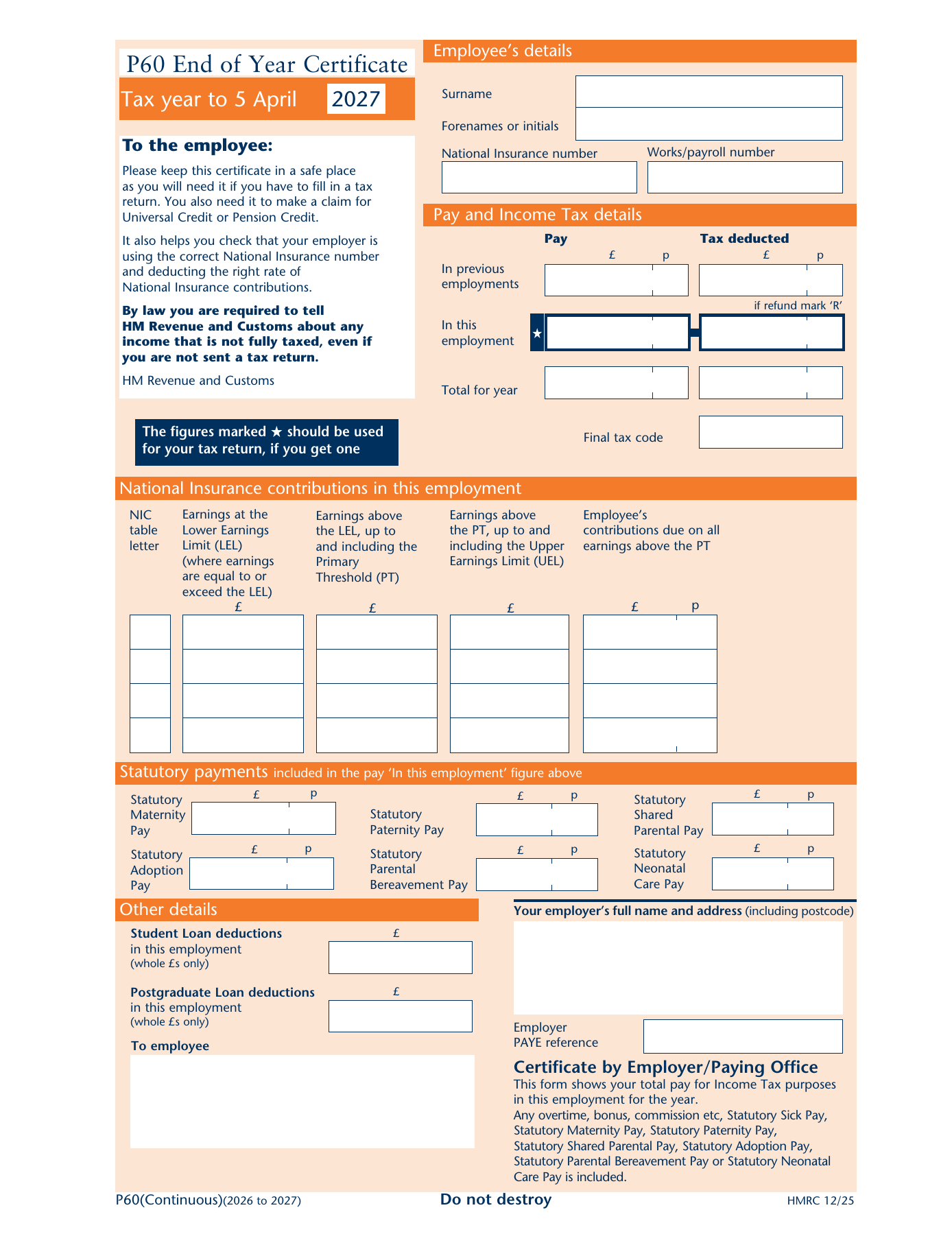
Employee details. Name, National Insurance number, works number and the tax code at the end of the year.
Pay and Income Tax. Pay and tax in this employment, plus anything carried in from a previous job in the same year.
National Insurance. Earnings by NI letter, split across the lower earnings limit, primary threshold and upper earnings limit.
Statutory payments. Maternity, paternity, adoption and shared parental pay, then the employer’s certificate.
Each zone is explained in turn, with a zoom on the form, in What is a P60?.
Conclusion
Getting a P60 comes down to knowing who holds what. The employer holds the certificate and the duty to issue it; HMRC holds the data behind it and makes that data available online for the current and previous five tax years. Between a duplicate from the employer and a statement from HMRC, nobody is ever truly without proof of their pay and tax.
The longer trend favours the second route. As payroll data flows to HMRC in real time and digital P60s become the norm, the certificate is increasingly a convenience rather than the only record, and the days of a lost piece of paper jeopardising a mortgage application are ending.
Frequently asked questions
Can HMRC send a replacement P60?
No. The P60 is produced by the employer, and HMRC does not keep copies of the document itself. What HMRC can provide is the information that was on it: a statement of earnings or PAYE income history showing the same pay and tax figures, available through a Personal Tax Account, the HMRC app, or by contacting HMRC directly.
How does an employee get a P60 from a company that has closed down?
A dissolved employer cannot issue a duplicate, so the route is HMRC's records instead. A Personal Tax Account or the HMRC app shows pay and tax for the current and previous five tax years, and HMRC can provide employment history going back further on request. These records satisfy most lenders and official bodies in place of the original certificate.
When does the P60 for the latest tax year arrive?
The tax year ends on 5 April, and the employer must provide the P60 by 31 May. Most payroll software generates the certificates as soon as the final pay run of the year is processed, so many employees receive theirs in April. An employee who has not received one by early June should chase the employer before contacting HMRC.
Can a P60 be downloaded online?
Only from wherever the employer publishes it, typically a payslip or HR portal, since HMRC does not host P60 documents. What can be downloaded from HMRC, via the app or a Personal Tax Account, is a PDF of the PAYE income history showing the same figures, which serves the same purpose for most income-verification uses.
For what each box on the certificate means, see our guide to what is a P60, with the official 2026-27 form (PDF) to download.